
Blogger XML Tempate - Blue Dust
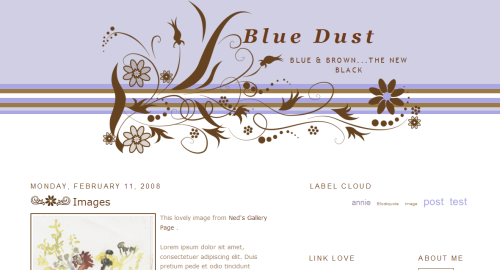
Click on image for working demo
A note to those of you that put my templates up for download. I appreciate that you like them enough to do so, but please link back to my post and don't put my template for download from your site. I enjoy the traffic!
Here is another swirly template. Yes, I love them. I thought maybe the A Day Without Chocolate template might be too pink for some. Or, maybe you just detest pink. So, this is another option.
This template is packed full of goodies:
- Fluid Widebar (Hack by me) I love the possibilities of the widebar.
- Label Cloud (Hack by phydeaux3) Can you tell I think all blogs should be equipped with this lovely hack?
- Fluid style (Hack by me)
- Two sidebars
- Post area
- Lovely footer
- Custom favicon
- Fancy links (go ahead...hover over one!)
- Clickable header on post page
- Custom blockquotes
- Brush credits: Stilok and hawksmont
UPDATE:
03/07/08: Fixed problem in IE to eliminate horizontal scrollbar and header description placement.
o4/09/08: 04/09/08: Added text file to copy and paste. You will still have to add the images as indicated in the instructions from the zip file. Go to the Dashboard | Layout | Edit HTML | Edit Template window. +/-Paste this text in that window:
<?xml version="1.0" encoding="UTF-8" ?>
<!DOCTYPE html PUBLIC "-//W3C//DTD XHTML 1.0 Strict//EN" "http://www.w3.org/TR/xhtml1/DTD/xhtml1-strict.dtd">
<html expr:dir='data:blog.languageDirection' xmlns='http://www.w3.org/1999/xhtml' xmlns:b='http://www.google.com/2005/gml/b' xmlns:data='http://www.google.com/2005/gml/data' xmlns:expr='http://www.google.com/2005/gml/expr'>
<head>
<link href='IMAGE/favicon.png' rel='shortcut icon'/>
<link href='IMAGE/favicon.png' rel='icon'/>
<b:include data='blog' name='all-head-content'/>
<title><data:blog.pageTitle/></title>
<b:skin><![CDATA[/*
-----------------------------------------------
Blogger Template Style
Name: Minima
Designer: Douglas Bowman
URL: www.stopdesign.com
Date: 26 Feb 2004
Updated by: Blogger Team
----------------------------------------------- */
/* Variable definitions
====================
<Variable name="bgcolor" description="Page Background Color"
type="color" default="#fff" value="#ffffff">
<Variable name="textcolor" description="Text Color"
type="color" default="#987654" value="#987654">
<Variable name="linkcolor" description="Link Color"
type="color" default="#987654" value="#6f3c1b">
<Variable name="pagetitlecolor" description="Blog Title Color"
type="color" default="#987654" value="#6f3c1b">
<Variable name="descriptioncolor" description="Blog Description Color"
type="color" default="#987654" value="#6f3c1b">
<Variable name="titlecolor" description="Post Title Color"
type="color" default="#c60" value="#6f3c1b">
<Variable name="bordercolor" description="Border Color"
type="color" default="#ffb6c1" value="#ffb6c1">
<Variable name="sidebarcolor" description="Sidebar Title Color"
type="color" default="#999" value="#6f3c1b">
<Variable name="sidebartextcolor" description="Sidebar Text Color"
type="color" default="#987654" value="#987654">
<Variable name="visitedlinkcolor" description="Visited Link Color"
type="color" default="#999" value="#999999">
<Variable name="bodyfont" description="Text Font"
type="font" default="normal normal 100% Georgia, Serif" value="normal normal 110% Trebuchet, Trebuchet MS, Arial, sans-serif">
<Variable name="headerfont" description="Sidebar Title Font"
type="font"
default="normal normal 78% 'Trebuchet MS',Trebuchet,Arial,Verdana,Sans-serif" value="italic bold 115% 'Trebuchet MS',Trebuchet,Arial,Verdana,Sans-serif">
<Variable name="pagetitlefont" description="Blog Title Font"
type="font"
default="normal normal 200% Georgia, Serif" value="italic bold 266% Times, serif">
<Variable name="descriptionfont" description="Blog Description Font"
type="font"
default="normal normal 78% 'Trebuchet MS', Trebuchet, Arial, Verdana, Sans-serif" value="normal normal 116% 'Trebuchet MS', Trebuchet, Arial, Verdana, Sans-serif">
<Variable name="postfooterfont" description="Post Footer Font"
type="font"
default="normal normal 78% 'Trebuchet MS', Trebuchet, Arial, Verdana, Sans-serif" value="normal normal 78% 'Trebuchet MS', Trebuchet, Arial, Verdana, Sans-serif">
<Variable name="startSide" description="Side where text starts in blog language"
type="automatic" default="left" value="left">
<Variable name="endSide" description="Side where text ends in blog language"
type="automatic" default="right" value="right">
*/
/* Use this with templates/template-twocol.html */
body {
background: url('IMAGE/choc_bg.png') top left repeat-x #FFFFFF;
margin:0;
color:$textcolor;
font:x-small Georgia Serif;
font-size/* */:/**/small;
font-size: /**/small;
text-align: center;
}
a:link {
color:$linkcolor;
text-decoration:none;
}
a:visited {
color:$visitedlinkcolor;
text-decoration:none;
}
a:hover {
background-color: #FADADD;
color: #987654;
text-decoration: none;
}
a img {
border-width:0;
}
/* Header
-----------------------------------------------
*/
#header-wrapper {
width:800px;
margin: -5px 0 35px 158px;
}
#header-inner {
background-position: center;
margin-left: auto;
margin-right: auto;
}
#header {
margin: 5px;
text-align: center;
color:$pagetitlecolor;
}
#header h1 {
margin:5px 5px 0;
padding: 60px 15px 20px .25em;
line-height:1.2em;
text-transform:none;
letter-spacing:.2em;
font: $pagetitlefont;
color: $pagetitlecolor;
}
#header a {
color:$pagetitlecolor;
text-decoration:none;
}
#header a:hover {
background-color: #FADADD;
color: #987654;
text-decoration: none;
}
#header .description {
margin:0 5px 5px;
padding:0 20px 15px;
max-width:700px;
text-transform:uppercase;
letter-spacing:.2em;
line-height: 1.4em;
font: $descriptionfont;
color: $descriptioncolor;
}
#header img {
margin-$startSide: auto;
margin-$endSide: auto;
}
#navbar-iframe {
display: none !important;
}
/* Outer-Wrapper
----------------------------------------------- */
#outer-wrapper {
margin-left: 5%;
margin-right: 2%;
text-align: left;
width: 93%;
padding: 0 10px 10px 10px;
text-align:$startSide;
font: $bodyfont;
}
#main-wrapper {
width: 45%;
float: $startSide;
word-wrap: break-word; /* fix for long text breaking sidebar float in IE */
overflow: hidden; /* fix for long non-text content breaking IE sidebar float */
}
#widebar-wrapper {
float: right;
margin: 0 45px 0 35px;
padding-bottom: 10px;
width: 40%;
word-wrap: break-word;
color: $textcolor;
}
#widebar {
padding: 10px 0 5px 0px;
width: 100%;
word-wrap: break-word;
color: $textcolor;
}
#leftsidebar-wrapper {
float: right;
margin: 30px 0 0 0;
overflow: hidden;
width: 22%;
word-wrap: break-word;
}
#rightsidebar-wrapper {
float: right;
margin: 30px 0 0 0;
overflow: hidden;
width: 22%;
word-wrap: break-word;
}
/* Headings
----------------------------------------------- */
h2 {
margin:1.5em 0 .75em;
font:$headerfont;
line-height: 1.4em;
text-transform:uppercase;
letter-spacing:.2em;
color:$sidebarcolor;
}
/* Posts
-----------------------------------------------
*/
h2.date-header {
margin:1.5em 0 .5em;
}
.post {
margin:.5em 0 1.5em;
padding-bottom:1.5em;
}
.post h3 {
background:url(IMAGE/post_swirl.png) no-repeat;
margin:.25em 0 0;
padding:0 0 4px 85px;
font-size:140%;
font-weight:normal;
line-height:1.4em;
color:$titlecolor;
}
.post h3 a, .post h3 a:visited, .post h3 strong {
display:block;
text-decoration:none;
color:$titlecolor;
font-weight:normal;
}
.post h3 strong, .post h3 a:hover {
color:$textcolor;
background-color: #FADADD;
color: #987654;
text-decoration: none;
}
.post p {
margin:0 0 .75em;
line-height:1.6em;
}
.post-footer {
margin: .75em 0;
color:$sidebarcolor;
text-transform:uppercase;
letter-spacing:.1em;
font: $postfooterfont;
line-height: 1.4em;
}
.comment-link {
margin-$startSide:.6em;
}
.post img {
padding:4px;
border:2px solid $bordercolor;
}
blockquote{
background-color: transparent;
border-top: 3px dotted #ffb6c1;
border-bottom: 3px dotted #ffb6c1;
padding: 15px;
font-style: oblique;
font-size: 1em;
margin-left: 5%;
margin-right: 5%;
}
/* Comments
----------------------------------------------- */
#comments h4 {
margin:1em 0;
font-weight: bold;
line-height: 1.4em;
text-transform:uppercase;
letter-spacing:.2em;
color: $sidebarcolor;
}
#comments-block {
margin:1em 0 1.5em;
line-height:1.6em;
}
#comments-block .comment-author {
margin:.5em 0;
}
#comments-block .comment-body {
margin:.25em 0 0;
}
#comments-block .comment-footer {
margin:-.25em 0 2em;
line-height: 1.4em;
text-transform:uppercase;
letter-spacing:.1em;
}
#comments-block .comment-body p {
margin:0 0 .75em;
}
.deleted-comment {
font-style:italic;
color:gray;
}
#blog-pager-newer-link {
float: $startSide;
}
#blog-pager-older-link {
float: $endSide;
}
#blog-pager {
text-align: center;
}
.feed-links {
clear: both;
line-height: 2.5em;
}
/* Sidebar Content
----------------------------------------------- */
.sidebar {
color: $sidebartextcolor;
line-height: 1.5em;
}
.sidebar ul {
list-style:none;
margin:0 0 0;
padding:0 0 0;
}
.sidebar li {
margin:0;
padding-top:0;
padding-$endSide:0;
padding-bottom:.25em;
padding-$startSide:15px;
text-indent:-15px;
line-height:1.5em;
}
.sidebar .widget, .main .widget {
margin:0 0 1.5em;
padding:0 0 1.5em;
}
.main .Blog {
border-bottom-width: 0;
}
/* Profile
----------------------------------------------- */
.profile-img {
float: $startSide;
margin-top: 0;
margin-$endSide: 5px;
margin-bottom: 5px;
margin-$startSide: 0;
padding: 4px;
border: 1px solid $bordercolor;
}
.profile-data {
margin:0;
text-transform:uppercase;
letter-spacing:.1em;
font: $postfooterfont;
color: $sidebarcolor;
font-weight: bold;
line-height: 1.6em;
}
.profile-datablock {
margin:.5em 0 .5em;
}
.profile-textblock {
margin: 0.5em 0;
line-height: 1.6em;
}
.profile-link {
font: $postfooterfont;
text-transform: uppercase;
letter-spacing: .1em;
}
/* Footer
----------------------------------------------- */
#footer {
width:660px;
clear:both;
margin:0 auto;
padding-top:15px;
line-height: 1.6em;
text-transform:uppercase;
letter-spacing:.1em;
text-align: center;
}
p.credits {
font-family: sans-serif;
font-style: normal;
font-variant: normal;
font-weight: normal;
font-size: small;
line-height: 100%;
word-spacing: normal;
letter-spacing: 0.3ex;
text-decoration: none;
text-transform: lowercase;
text-align: center;
text-indent: 0ex;
}
/** Page structure tweaks for layout editor wireframe */
body#layout #header {
width: 400px;
}
/* Label Cloud Styles
----------------------------------------------- */
#labelCloud {text-align:center;font-family:arial,sans-serif;}
#labelCloud .label-cloud li{display:inline;background-image:none !important;padding:0 5px;margin:0;vertical-align:baseline !important;border:0 !important;}
#labelCloud ul{list-style-type:none;margin:0 auto;padding:0;}
#labelCloud a img{border:0;display:inline;margin:0 0 0 3px;padding:0}
#labelCloud a{text-decoration:none}
#labelCloud a:hover{text-decoration:underline}
#labelCloud li a{}
#labelCloud .label-cloud {}
#labelCloud .label-count {padding-left:0.2em;font-size:9px;color:#000}
#labelCloud .label-cloud li:before{content:"" !important}
]]></b:skin>
</head>
<script type='text/javascript'>
// Label Cloud User Variables
var cloudMin = 1;
var maxFontSize = 25;
var maxColor = [213,84,128];
var minFontSize = 10;
var minColor = [152,118,84];
var lcShowCount = false;
</script>
<body>
<div id='outer-wrapper'><div id='wrap2'>
<!-- skip links for text browsers -->
<span id='skiplinks' style='display:none;'>
<a href='#main'>skip to main </a> |
<a href='#sidebar'>skip to sidebar</a>
</span>
<div id='header-wrapper'>
<b:section class='header' id='header' maxwidgets='1' showaddelement='no'>
<b:widget id='Header1' locked='true' title='Header Widget Sample (Header)' type='Header'>
<b:includable id='title'>
<b:if cond='data:blog.url == data:blog.homepageUrl'>
<data:title/>
<b:else/>
<a expr:href='data:blog.homepageUrl'><data:title/></a>
</b:if>
</b:includable>
<b:includable id='description'>
<div class='descriptionwrapper'>
<p class='description'><span><data:description/></span></p>
</div>
</b:includable>
<b:includable id='main'>
<b:if cond='data:useImage'>
<b:if cond='data:imagePlacement == "REPLACE"'>
<!--Show just the image, no text-->
<div id='header-inner'>
<a expr:href='data:blog.homepageUrl' style='display: block'>
<img expr:alt='data:title' expr:height='data:height' expr:id='data:widget.instanceId + "_headerimg"' expr:src='data:sourceUrl' expr:width='data:width' style='display: block'/>
</a>
</div>
<b:else/>
<!--
Show image as background to text. You can't really calculate the width
reliably in JS because margins are not taken into account by any of
clientWidth, offsetWidth or scrollWidth, so we don't force a minimum
width. This results in a margin-width's worth of pixels being cropped,
which is probably better than having them overflow out of the div.
-->
<b:if cond='data:blog.languageDirection == "rtl"'>
<div expr:style='"background-image: url(\"" + data:sourceUrl + "\"); " + "background-position: right; " + "min-height: " + data:height + "px;" + "_height: " + data:height + "px;" + "background-repeat: no-repeat; "' id='header-inner'>
<div class='titlewrapper' style='background: transparent'>
<h1 class='title' style='background: transparent; border-width: 0px'>
<b:include name='title'/>
</h1>
</div>
<b:include name='description'/>
</div>
<b:else/>
<div expr:style='"background-image: url(\"" + data:sourceUrl + "\"); " + "background-position: left; " + "min-height: " + data:height + "px;" + "_height: " + data:height + "px;" + "background-repeat: no-repeat; "' id='header-inner'>
<div class='titlewrapper' style='background: transparent'>
<h1 class='title' style='background: transparent; border-width: 0px'>
<b:include name='title'/>
</h1>
</div>
<b:include name='description'/>
</div>
</b:if>
</b:if>
<b:else/>
<!--No header image -->
<div id='header-inner'>
<div class='titlewrapper'>
<h1 class='title'>
<b:include name='title'/>
</h1>
</div>
<b:include name='description'/>
</div>
</b:if>
</b:includable>
</b:widget>
</b:section>
</div>
<div id='content-wrapper'>
<div id='crosscol-wrapper' style='text-align:center'>
<b:section class='crosscol' id='crosscol' showaddelement='no'/>
</div>
<div id='main-wrapper'>
<b:section class='main' id='main' showaddelement='no'>
<b:widget id='Blog1' locked='true' title='Blog Posts' type='Blog'>
<b:includable id='nextprev'>
<div class='blog-pager' id='blog-pager'>
<b:if cond='data:newerPageUrl'>
<span id='blog-pager-newer-link'>
<a class='blog-pager-newer-link' expr:href='data:newerPageUrl' expr:id='data:widget.instanceId + "_blog-pager-newer-link"' expr:title='data:newerPageTitle'><data:newerPageTitle/></a>
</span>
</b:if>
<b:if cond='data:olderPageUrl'>
<span id='blog-pager-older-link'>
<a class='blog-pager-older-link' expr:href='data:olderPageUrl' expr:id='data:widget.instanceId + "_blog-pager-older-link"' expr:title='data:olderPageTitle'><data:olderPageTitle/></a>
</span>
</b:if>
<b:if cond='data:blog.homepageUrl != data:blog.url'>
<a class='home-link' expr:href='data:blog.homepageUrl'><data:homeMsg/></a>
<b:else/>
<b:if cond='data:newerPageUrl'>
<a class='home-link' expr:href='data:blog.homepageUrl'><data:homeMsg/></a>
</b:if>
</b:if>
</div>
<div class='clear'/>
</b:includable>
<b:includable id='backlinks' var='post'>
<a name='links'/><h4><data:post.backlinksLabel/></h4>
<b:if cond='data:post.numBacklinks != 0'>
<dl class='comments-block' id='comments-block'>
<b:loop values='data:post.backlinks' var='backlink'>
<div class='collapsed-backlink backlink-control'>
<dt class='comment-title'>
<span class='backlink-toggle-zippy'> </span>
<a expr:href='data:backlink.url' rel='nofollow'><data:backlink.title/></a>
<b:include data='backlink' name='backlinkDeleteIcon'/>
</dt>
<dd class='comment-body collapseable'>
<data:backlink.snippet/>
</dd>
<dd class='comment-footer collapseable'>
<span class='comment-author'><data:post.authorLabel/> <data:backlink.author/></span>
<span class='comment-timestamp'><data:post.timestampLabel/> <data:backlink.timestamp/></span>
</dd>
</div>
</b:loop>
</dl>
</b:if>
<p class='comment-footer'>
<a class='comment-link' expr:href='data:post.createLinkUrl' expr:id='data:widget.instanceId + "_backlinks-create-link"' target='_blank'><data:post.createLinkLabel/></a>
</p>
</b:includable>
<b:includable id='post' var='post'>
<div class='post hentry uncustomized-post-template'>
<a expr:name='data:post.id'/>
<b:if cond='data:post.title'>
<h3 class='post-title entry-title'>
<b:if cond='data:post.link'>
<a expr:href='data:post.link'><data:post.title/></a>
<b:else/>
<b:if cond='data:post.url'>
<a expr:href='data:post.url'><data:post.title/></a>
<b:else/>
<data:post.title/>
</b:if>
</b:if>
</h3>
</b:if>
<div class='post-header-line-1'/>
<div class='post-body entry-content'>
<p><data:post.body/></p>
<div style='clear: both;'/> <!-- clear for photos floats -->
</div>
<div class='post-footer'>
<p class='post-footer-line post-footer-line-1'>
<span class='post-author vcard'>
<b:if cond='data:top.showAuthor'>
<data:top.authorLabel/>
<span class='fn'><data:post.author/></span>
</b:if>
</span>
<span class='post-timestamp'>
<b:if cond='data:top.showTimestamp'>
<data:top.timestampLabel/>
<b:if cond='data:post.url'>
<a class='timestamp-link' expr:href='data:post.url' rel='bookmark' title='permanent link'><abbr class='published' expr:title='data:post.timestampISO8601'><data:post.timestamp/></abbr></a>
</b:if>
</b:if>
</span>
<span class='post-comment-link'>
<b:if cond='data:blog.pageType != "item"'>
<b:if cond='data:post.allowComments'>
<a class='comment-link' expr:href='data:post.addCommentUrl' expr:onclick='data:post.addCommentOnclick'><b:if cond='data:post.numComments == 1'>1 <data:top.commentLabel/><b:else/><data:post.numComments/> <data:top.commentLabelPlural/></b:if></a>
</b:if>
</b:if>
</span>
<!-- backlinks -->
<span class='post-backlinks post-comment-link'>
<b:if cond='data:blog.pageType != "item"'>
<b:if cond='data:post.showBacklinks'>
<a class='comment-link' expr:href='data:post.url + "#links"'><data:top.backlinkLabel/></a>
</b:if>
</b:if>
</span>
<span class='post-icons'>
<!-- email post links -->
<b:if cond='data:post.emailPostUrl'>
<span class='item-action'>
<a expr:href='data:post.emailPostUrl' expr:title='data:top.emailPostMsg'>
<img alt='' class='icon-action' src='http://www.blogger.com/img/icon18_email.gif'/>
</a>
</span>
</b:if>
<!-- quickedit pencil -->
<b:include data='post' name='postQuickEdit'/>
</span>
</p>
<p class='post-footer-line post-footer-line-2'>
<span class='post-labels'>
<b:if cond='data:post.labels'>
<data:postLabelsLabel/>
<b:loop values='data:post.labels' var='label'>
<a expr:href='data:label.url' rel='tag'><data:label.name/></a><b:if cond='data:label.isLast != "true"'>,</b:if>
</b:loop>
</b:if>
</span>
</p>
<p class='post-footer-line post-footer-line-3'/>
</div>
</div>
</b:includable>
<b:includable id='commentDeleteIcon' var='comment'>
<span expr:class='"item-control " + data:comment.adminClass'>
<a expr:href='data:comment.deleteUrl' expr:title='data:top.deleteCommentMsg'>
<span class='delete-comment-icon'> </span>
</a>
</span>
</b:includable>
<b:includable id='status-message'>
<b:if cond='data:navMessage'>
<div class='status-msg-wrap'>
<div class='status-msg-body'>
<data:navMessage/>
</div>
<div class='status-msg-border'>
<div class='status-msg-bg'>
<div class='status-msg-hidden'><data:navMessage/></div>
</div>
</div>
</div>
<div style='clear: both;'/>
</b:if>
</b:includable>
<b:includable id='feedLinks'>
<b:if cond='data:blog.pageType != "item"'> <!-- Blog feed links -->
<b:if cond='data:feedLinks'>
<div class='blog-feeds'>
<b:include data='feedLinks' name='feedLinksBody'/>
</div>
</b:if>
<b:else/> <!--Post feed links -->
<div class='post-feeds'>
<b:loop values='data:posts' var='post'>
<b:if cond='data:post.allowComments'>
<b:if cond='data:post.feedLinks'>
<b:include data='post.feedLinks' name='feedLinksBody'/>
</b:if>
</b:if>
</b:loop>
</div>
</b:if>
</b:includable>
<b:includable id='backlinkDeleteIcon' var='backlink'>
<span expr:class='"item-control " + data:backlink.adminClass'>
<a expr:href='data:backlink.deleteUrl' expr:title='data:top.deleteBacklinkMsg'>
<span class='delete-comment-icon'> </span>
</a>
</span>
</b:includable>
<b:includable id='feedLinksBody' var='links'>
<div class='feed-links'>
<data:feedLinksMsg/>
<b:loop values='data:links' var='f'>
<a class='feed-link' expr:href='data:f.url' expr:type='data:f.mimeType' target='_blank'><data:f.name/> (<data:f.feedType/>)</a>
</b:loop>
</div>
</b:includable>
<b:includable id='postQuickEdit' var='post'>
<b:if cond='data:post.editUrl'>
<span expr:class='"item-control " + data:post.adminClass'>
<a expr:href='data:post.editUrl' expr:title='data:top.editPostMsg'>
<img alt='' class='icon-action' src='http://www.blogger.com/img/icon18_edit_allbkg.gif'/>
</a>
</span>
</b:if>
</b:includable>
<b:includable id='comments' var='post'>
<div class='comments' id='comments'>
<a name='comments'/>
<b:if cond='data:post.allowComments'>
<h4>
<b:if cond='data:post.numComments == 1'>
1 <data:commentLabel/>:
<b:else/>
<data:post.numComments/> <data:commentLabelPlural/>:
</b:if>
</h4>
<dl id='comments-block'>
<b:loop values='data:post.comments' var='comment'>
<dt expr:class='"comment-author " + data:comment.authorClass' expr:id='data:comment.anchorName'>
<a expr:name='data:comment.anchorName'/>
<b:if cond='data:comment.authorUrl'>
<a expr:href='data:comment.authorUrl' rel='nofollow'><data:comment.author/></a>
<b:else/>
<data:comment.author/>
</b:if>
<data:commentPostedByMsg/>
</dt>
<dd class='comment-body'>
<b:if cond='data:comment.isDeleted'>
<span class='deleted-comment'><data:comment.body/></span>
<b:else/>
<p><data:comment.body/></p>
</b:if>
</dd>
<dd class='comment-footer'>
<span class='comment-timestamp'>
<a expr:href='data:comment.url' title='comment permalink'>
<data:comment.timestamp/>
</a>
<b:include data='comment' name='commentDeleteIcon'/>
</span>
</dd>
</b:loop>
</dl>
<p class='comment-footer'>
<a expr:href='data:post.addCommentUrl' expr:onclick='data:post.addCommentOnclick'><data:postCommentMsg/></a>
</p>
</b:if>
<div id='backlinks-container'>
<div expr:id='data:widget.instanceId + "_backlinks-container"'>
<b:if cond='data:post.showBacklinks'>
<b:include data='post' name='backlinks'/>
</b:if>
</div>
</div>
</div>
</b:includable>
<b:includable id='main' var='top'>
<!-- posts -->
<div class='blog-posts hfeed'>
<b:include data='top' name='status-message'/>
<data:adStart/>
<b:loop values='data:posts' var='post'>
<b:if cond='data:post.dateHeader'>
<h2 class='date-header'><data:post.dateHeader/></h2>
</b:if>
<b:include data='post' name='post'/>
<b:if cond='data:blog.pageType == "item"'>
<b:include data='post' name='comments'/>
</b:if>
<b:if cond='data:post.includeAd'>
<data:adEnd/>
<data:adCode/>
<data:adStart/>
</b:if>
</b:loop>
<data:adEnd/>
</div>
<!-- navigation -->
<b:include name='nextprev'/>
<!-- feed links -->
<b:include name='feedLinks'/>
</b:includable>
</b:widget>
</b:section>
</div>
<div id='widebar-wrapper'>
<b:section class='sidebar' id='widebar1' preferred='yes'>
<b:widget id='Label1' locked='false' title='Label Cloud' type='Label'>
<b:includable id='main'>
<b:if cond='data:title'>
<h2><data:title/></h2>
</b:if>
<div class='widget-content'>
<div id='labelCloud'/>
<script type='text/javascript'>
// Don't change anything past this point -----------------
// Cloud function s() ripped from del.icio.us
function s(a,b,i,x){
if(a>b){
var m=(a-b)/Math.log(x),v=a-Math.floor(Math.log(i)*m)
}
else{
var m=(b-a)/Math.log(x),v=Math.floor(Math.log(i)*m+a)
}
return v
}
var c=[];
var labelCount = new Array();
var ts = new Object;
<b:loop values='data:labels' var='label'>
var theName = "<data:label.name/>";
ts[theName] = <data:label.count/>;
</b:loop>
for (t in ts){
if (!labelCount[ts[t]]){
labelCount[ts[t]] = new Array(ts[t])
}
}
var ta=cloudMin-1;
tz = labelCount.length - cloudMin;
lc2 = document.getElementById('labelCloud');
ul = document.createElement('ul');
ul.className = 'label-cloud';
for(var t in ts){
if(ts[t] < cloudMin){
continue;
}
for (var i=0;3 > i;i++) {
c[i]=s(minColor[i],maxColor[i],ts[t]-ta,tz)
}
var fs = s(minFontSize,maxFontSize,ts[t]-ta,tz);
li = document.createElement('li');
li.style.fontSize = fs+'px';
li.style.lineHeight = '1';
a = document.createElement('a');
a.title = ts[t]+' Posts in '+t;
a.style.color = 'rgb('+c[0]+','+c[1]+','+c[2]+')';
a.href = '/search/label/'+encodeURIComponent(t);
if (lcShowCount){
span = document.createElement('span');
span.innerHTML = '('+ts[t]+') ';
span.className = 'label-count';
a.appendChild(document.createTextNode(t));
li.appendChild(a);
li.appendChild(span);
}
else {
a.appendChild(document.createTextNode(t));
li.appendChild(a);
}
ul.appendChild(li);
abnk = document.createTextNode(' ');
ul.appendChild(abnk);
}
lc2.appendChild(ul);
</script>
<noscript>
<ul>
<b:loop values='data:labels' var='label'>
<li>
<b:if cond='data:blog.url == data:label.url'>
<data:label.name/>
<b:else/>
<a expr:href='data:label.url'><data:label.name/></a>
</b:if>
(<data:label.count/>)
</li>
</b:loop>
</ul>
</noscript>
<b:include name='quickedit'/>
</div>
</b:includable>
</b:widget>
</b:section></div>
<div id='leftsidebar-wrapper'>
<b:section class='sidebar' id='leftsidebar' preferred='yes'>
<b:widget id='BlogArchive1' locked='false' title='Blog Archive' type='BlogArchive'>
<b:includable id='main'>
<b:if cond='data:title'>
<h2><data:title/></h2>
</b:if>
<div class='widget-content'>
<div id='ArchiveList'>
<div expr:id='data:widget.instanceId + "_ArchiveList"'>
<b:if cond='data:style == "HIERARCHY"'>
<b:include data='data' name='interval'/>
</b:if>
<b:if cond='data:style == "FLAT"'>
<b:include data='data' name='flat'/>
</b:if>
<b:if cond='data:style == "MENU"'>
<b:include data='data' name='menu'/>
</b:if>
</div>
</div>
<b:include name='quickedit'/>
</div>
</b:includable>
<b:includable id='flat' var='data'>
<ul>
<b:loop values='data:data' var='i'>
<li class='archivedate'>
<a expr:href='data:i.url'><data:i.name/></a> (<data:i.post-count/>)
</li>
</b:loop>
</ul>
</b:includable>
<b:includable id='menu' var='data'>
<select expr:id='data:widget.instanceId + "_ArchiveMenu"'>
<option value=''><data:title/></option>
<b:loop values='data:data' var='i'>
<option expr:value='data:i.url'><data:i.name/> (<data:i.post-count/>)</option>
</b:loop>
</select>
</b:includable>
<b:includable id='interval' var='intervalData'>
<b:loop values='data:intervalData' var='i'>
<ul>
<li expr:class='"archivedate " + data:i.expclass'>
<b:include data='i' name='toggle'/>
<a class='post-count-link' expr:href='data:i.url'><data:i.name/></a>
<span class='post-count' dir='ltr'>(<data:i.post-count/>)</span>
<b:if cond='data:i.data'>
<b:include data='i.data' name='interval'/>
</b:if>
<b:if cond='data:i.posts'>
<b:include data='i.posts' name='posts'/>
</b:if>
</li>
</ul>
</b:loop>
</b:includable>
<b:includable id='toggle' var='interval'>
<b:if cond='data:interval.toggleId'>
<b:if cond='data:interval.expclass == "expanded"'>
<a class='toggle' expr:href='data:widget.actionUrl + "&action=toggle" + "&dir=close&toggle=" + data:interval.toggleId + "&toggleopen=" + data:toggleopen'>
<span class='zippy toggle-open'>▼ </span>
</a>
<b:else/>
<a class='toggle' expr:href='data:widget.actionUrl + "&action=toggle" + "&dir=open&toggle=" + data:interval.toggleId + "&toggleopen=" + data:toggleopen'>
<span class='zippy'>
<b:if cond='data:blog.languageDirection == "rtl"'>
◄
<b:else/>
►
</b:if>
</span>
</a>
</b:if>
</b:if>
</b:includable>
<b:includable id='posts' var='posts'>
<ul class='posts'>
<b:loop values='data:posts' var='i'>
<li><a expr:href='data:i.url'><data:i.title/></a></li>
</b:loop>
</ul>
</b:includable>
</b:widget>
</b:section>
</div>
<div id='rightsidebar-wrapper'>
<b:section class='sidebar' id='rightsidebar' preferred='yes'>
<b:widget id='LinkList1' locked='false' title='Link Love' type='LinkList'>
<b:includable id='main'>
<b:if cond='data:title'><h2><data:title/></h2></b:if>
<div class='widget-content'>
<ul>
<b:loop values='data:links' var='link'>
<li><a expr:href='data:link.target'><data:link.name/></a></li>
</b:loop>
</ul>
<b:include name='quickedit'/>
</div>
</b:includable>
</b:widget>
</b:section>
</div>
<!-- spacer for skins that want sidebar and main to be the same height-->
<div class='clear'> </div>
</div> <!-- end content-wrapper -->
<div id='footer-wrapper'>
<b:section class='footer' id='footer'>
<b:widget id='HTML1' locked='false' title='' type='HTML'>
<b:includable id='main'>
<!-- only display title if it's non-empty -->
<b:if cond='data:title != ""'>
<h2 class='title'><data:title/></h2>
</b:if>
<div class='widget-content'>
<data:content/>
</div>
<b:include name='quickedit'/>
</b:includable>
</b:widget>
</b:section>
</div>
</div></div> <!-- end outer-wrapper -->
</body>
</html>

 Labels:
Blogger Beta,
templates
Labels:
Blogger Beta,
templates













81 Comments:
Love this layout! Thank you for sharing :)
@Miranda, you are welcome! I added your blog to the BlogU Blogroll.
Cute baby!
... one question to BloggU too, why not ;-)
Hello,
I discuss about this topic with David from eblogtemplate.com in his rubric “What Blogger Template Should I Make Next?” Contest”
http://www.eblogtemplates.com/what-blogger-template-should-i-make-next-contest/
It surprise me that so few had try to convert the WP theme so called “Style Magazine”
Like the slogan say: “Themes Style Magazine a revolutioning WP” why can this theme Style Magazine not revolutioning Blogspot.com too ? That’s my question and who will start this revolution ? Jackbook.com, blogandweb.com eblogtemplates.com or someone else ?
Justin Tadlock made really nice WP Theme Style Magazione but he is not alone. Brian Gardner too with his revolutions themes for WP.
http://justintadlock.com/
http://www.briangardner.com/
look at this marvellous templates hier so called “Revolution Themes”
http://www.revolutiontheme.com/
Are there not so marvellous ? Can this templates not revolutioning Blogspot.com too ?
That’s my question to Jackbook.com
Thanks for all and God bless your work.
SMSreports
@Fr. Steve, I'm not skilled in converting WP to Blogger. At least I have never attempted to do so. But, thank you for the nice post and ideas.
Hello Annie,
Thanks to you for your answer.
God bless u
SMSreports
...from Fr. Steve
Thank you Annie! Both for the add and the compliment, so sweet of you :)
Hi there,
Love the new template. When visiting the site I noticed when I clicked on the links in various locations on the template, the links would open up in the same window? I'm building a site with a navigation bar and when you click on the links, they open in a new window. Can you give me any adivse on this?
Also, my links are underlined, how can I get rid of this? Do you have a different code I can use so that another window doesn't open? Thanks again for all of your help. You answered several questions for me in the past.
This is my first time here and really have found some useful information on this website. I really like the template, I recently purchased a new template for my website.
Annie,
I love the Day without Chocolate, but this is so much nicer, and not too girly. The blue and brown are so 'in' now.
Patti
hi !! thanks for useful information.. i link u.. :)
@mullinsamber, The target attribute will do that for you target="_blank". Here is an example:
<a href="http://www.bloggeruniversity.blogspot.com/"
target="_blank">BlogU</a>
If you want all links on your site to open in a new window, then you can make it default to that by adding :
<base target="_blank">
between the <head> and </head> tags and you won't have to change each link. (Note...I haven't tried this approach.)
@mullinsamber, I almost forgot, to remove the underline follow the instructions on this post:
How to remove dotted line from links.
I love this template! I am playing with it on a test blog, I was wondering if there's a way to bump the title over a bit so it's not under the scroll? I tried just adding the text in Paint, but then when I upload the new picture for some reason it is a tad darker than the original and it doesn't blend.
Thanks for your lovely template!
@Kim, I always forget that IE displays differently. Change this:
#outer-wrapper {
margin-left: 5%;
margin-right: 2%;
text-align: left;
width: 93%;
padding: 0 10px 10px 10px;
text-align:$startSide;
font: $bodyfont;
}
to this:
#outer-wrapper {
margin-left: 5%;
margin-right: 2%;
text-align: left;
width: 93%;
-width: 90%;
padding: 0 10px 10px 10px;
text-align:$startSide;
font: $bodyfont;
}
To get the description positioned correctly, find this:
#header .description {
margin:0 5px 0 400px;
padding:0 20px 0 15px;
max-width:700px;
text-transform:uppercase;
letter-spacing:.2em;
line-height: 1.4em;
font: $descriptionfont;
color: $descriptioncolor;
}
Change to this:
#header .description {
margin:0 5px 0 400px;
_margin-left: 420px;
padding:0 20px 0 15px;
max-width:700px;
text-transform:uppercase;
letter-spacing:.2em;
line-height: 1.4em;
font: $descriptionfont;
color: $descriptioncolor;
}
Thanks so much, Annie! I am loving the new template.
I have one more question (I hate to ask!). Do you know how to remove the labels from the individual posts? For some reason they are showing up even though I don't have that option checked in the widget.
Thanks again,
Kim
THANK YOU THANK YOU THANK YOU!!!
I have been wanting a different template for ages but had no clue how to go about it. You made it so simple! Even for me!
Quick question - is there any way I can move my posts over towards the right more? There's a huge white space between my posts and the side bar...THANKS!
@Kim, the only way I can think of to remove a label is to go in the dashboard / posting / edit posts. You will see a little drop down box that says label actions. If you select all, then click on the down arrow, you can remove the labels from all the posts.
@Ashley, you are welcome! This template is set up to have the label cloud in the top 'widebar' over 2 sidebars. You have moved the label cloud to the right sidebar, plus you aren't using the left sidebar. Look in the page elements and drag and drop the elements around.
The posting area is positioned in that manner to accommodate two sidebars to the right of it. Take a look at my demo blog and you will see what I mean.
Thanks again, Annie, for taking the time to answer questions! I finally moved the template over from a test blog to my real one, and it looks very nice. I want the labels, just don't want them showing on each post. Usually you can hide them by unchecking the box in the post element on the page elements page. It's not working though, but I'll just live with it.
Thanks for the fun template!
Kim
@Kim, I forgot about the post Page Element! I knew there was someplace to set label settings, but I forgot about there. Problem with that is it is a universal setting. Too bad there isn't a way to do individual posts. There probably is, I just haven't come across it yet. If I ever do, I will let you know!
Hi Annie. I'm trying to implement the peek-a-boo navbar, and I have the needed code in the correct place, but when I try to either remove this code
#navbar-iframe {
display: none !important;
from your layout , it bumps the header down so it is not inline with the headersides. I also tried changing the "none" of that code to "hover" and it did the same thing.
Is there an easy solution to this? If not, that's ok, I can live with it :)
Thanks again.
@Miranda, from the comment section on Deadlines
Jenn left this solution. Since the base template is similar in both, it will work for the Blue Dust template also. The only thing is you will need to rework the header_sides.png image as she did. If you can't I will look into it when I have time. Anyway, here is what she wrote:
I love the template, thanks so much!
I too needed the navbar, so I played around with it a little.
changing
#navbar-iframe {
display: none !important;
}
to
#navbar-iframe {
display: block
}
gets the iframe back, but throws the line across the header off.
so I moved the lines down on top_sides.png to match it up.
Here's a link if anyone wants to download it: http://i98.photobucket.com/albums/l256/Bluepickle_1/top_sides3.png
I also robbed the hiding navbar from Blog U and changed it to black.
Thanks so much for an awesome design!!
Yeah, the post Page Element is great, but for some reason with this template it isn't working in regards to the labels. I have the box unchecked to show labels, but it is showing them anyway. Perhaps the label cloud code interferes with the hide feature?
Thanks for all your help. You are great about answering questions quickly and that is much appreciated! :D
Kim
Worked like a charm, thank you much! :)
@Kim, you know, I bet the label cloud is the reason! Glad you thought of that. I juat have never tried to turn off the label cloud. What you could do is remove the label cloud code from the template and see if that works. Here is the post that explains how to install it.
Hi Annie, I love this template! I'm trying to use it, but am having trouble with the little graphics that come with it. I managed to add the "header1" to my header, but where do I put "header sides" and that cute "post" swirly-thing for my posts??
Thanks,
Tammy
thispilgrimage
@Tammy, Thanks! If you look in the instructions that came in the zip file, it shows you the exact code where each image goes in the template. If you still have problems, email me.
Hi Annie,
Having a little issue with the Blog Title. I created a .png in PSE5 and used that for my title, only when one goes to my blog, they get a huge pink box over the title bar until the mouse if moved. Any idea how to change this? Or fix the title bar to the side so that I can use a smaller .png file for the title?
thanks so much.
Patti
Your template could not be parsed as it is not well-formed. Please make sure all XML elements are closed properly.
XML error message: The document type declaration for root element type "html" must end with '>'
I keep getting this msg' annie.
@Priya, I just downloaded the Blue Dust zip file and installed the xml file to a test blog. I didn't get any message. Stuff like this makes me crazy.
First, redownload the zip file and try a fresh install. If that doesn't work,I'm sending you the txt file...try copying and pasting it into your template.
@Patti, remove this from your template:
#header a:hover {
background-color: #FADADD;
color: #987654;
text-decoration: none;
Somehow it was a left over from A Day Without Chocolate (as I worked on them both around the same time) and some chocolate musta got on my dust!
I did make changes to the zip file, but you must have an older download.
Annie,
That took the pink box away, but added a blue one. Is there a way I can just make your .png have my title in it and take the 'blogger' title away? TY Patti
@Patti, I would merge the 2 files and put the font in the header1.png image. Maybe if you look at this post it will clarify it.
Tutorial: Custom Header for Blogger Using GIMP
Annie,
thanks, I did read that post and the other explaining how to remove the 'blogger' header, but could not fine the code in Blue Dust. Maybe that is where I'm going wrong. I cannot get the 'blogger' header to disappear, and when I turn the letters the same as the background, it shows through the new header.png that I created. I have been searching your whole blog for this before I even asked the question as I did not want to bother you. But I am stumped.
Annie, I think I got it. Can you please just take a look and let me know what you think. TY Patti
@Patti, Good job! Here is how to get the sides back and the header more centered. Find this part of your code:
#header-wrapper {
width:800px;
margin: -5px 0 -10px -65px;
}#header-inner {
background-image:url();
background-repeat:no-repeat;
height: 390px;
background-position: center;
margin-left: auto;
margin-right: auto;
and replace with this:
#header-wrapper {
width:1000px;
margin: -5px 0 35px 100px;
}
#header-inner {
background-image:url(
http://h1.ripway.com/anniebluesky/blogaid/header2_copy.png );
background-repeat:no-repeat;
height: 370px;
background-position: center;
margin-left: auto;
margin-right: auto;
}
That should get it all lined up!
I love your persistence. That is how I learned all that I have on BlogU. I just keep at it until I make it work!
Thanks for your assistance, Annie! I have uploaded the template, have an acct at Ripway, and have uploaded the images there. But I am not sure what it means to "place" image URLs in the code - this is all new to me.
Tammy
@Tammy, There are 2 ways to get the image URL after uploading the image to Ripway. Login in to your Ripway account and click on My Files in the top menu. Then locate the image you uploaded. Let's say you are first putting the header image in. Find header1.png in the list. You will see it says Direct Link URL:. Right under that is the image URL. Or, the other method is to click on (Open) and a new window will pop up with the image you want...and the URL in the address bar. Copy and paste that URL in the template. This particular one will go:
#header-inner { background-image:url(IMAGE/header1.png);
background-repeat:no-repeat;
height: 370px;
background-position: center;
margin-left: auto;
margin-right: auto;
}
Follow the same steps for all three images.
Let me know if you have any other problems.
I think I got it! All that scarey code had me paralyzed. Thanks for your help!!
Tammy
@Tammy, There is nothing to be scared of. It is just plug and play! And remember, you can do anything you want, and restore to what you started with...just save before any tinkering in the template!
I've been asking so many questions lately, sorry! :o) Anyway, it's about the navbar. I tried to bring it back to my blog by deleting the code you specified (I was using A Day Without Chocolate then) and the header ended up looking lopsided. After I changed to Blue Dust, I tried it again but it still came out lopsided. Am I doing it wrong? :o(
Thanks for your help!
That template is perfect for new married lady or best for flower blog or gardening blog.
@CQ, don't worry about asking questions!
Read the above comments where I talk about Jenn's fix. That should take care of it.
You're such a sweetheart! :o) Anyway, regarding Jenn's fix, I don't know how to rework the header_sides.png image to match it with the Blue Dust header. :o(
@CQ, You would save this image to your webhost that she made:
http://i98.photobucket.com/albums/l256/Bluepickle_1/top_sides3.png
and put it in the template in place of your top_sides image. Sorry, it is a bit confusing.
Hi! I followed the instructions you gave. I got the navbar back but the header sides were replaced with two-toned gray lines. Is it supposed to look like that? :o)
Hey Fabulous Annie!
I can't quite align the header description with the header image - help?!
http://nocowardsoul.blogspot.com
Thanks, Aerin
Dear Annie,
You are Great!
I learnt much things so thanks everything.I am a blogger university student. Blue dust is lovely template , I downloded it .There is no problem except label cloud.My label cloud is not a label cloud It is only label. Could you look at my blog , please?
Thanks ,Annie
@admin, I think your problem comes from editing the widget code. Go to New Blogger Tag Cloud and skip down to this part: <b:widget id='Label1' locked='false' title='Labels' type='Label'/> and see if that doesn't straighten it out. Please note... you need more than 2 labels for it to look like a cloud.
Dear Annie
Last, I sold my label cloud problem :))Thank you for your help...
Pretty layout. I'll definitely be using this one. Thanks!
Annie -
Thank you! I've been digging for ages for a better template and I LOVE this one!
I know this is elementary...I uploaded the pictures to my Flickr account and am not sure exactly how to code the URLs in. I know where to find the URLs...I'm just used to using the img src code. Help?
:)
@MichaM, <img src="IMAGE URL" width="XXX" height="XXX" alt="IMAGE TITLE" />
Cool, thanks...that's what I thought...somehow I've confused myself... :)
Okay, it's me again...
I seem to be stuck with header1 as the only graphic showing up. I've double checked the code a zillion times (it sure feels like it) and it seems to match up with the instructions in the zip file...
Am I nuts?
Nevermind!! I just clicked through from my tag name and it looks fine. It must have been cached and not refreshing properly. Sorry!
Hiya,
I am having issues with the images. The web-host you proviede in the instructions no longer work. Could you sugest a good webhosting site??
otherwise it looks great!!!
@chatabox girl, I'm having difficulties with RipWay also. So, I have taken to using flickr. But, you can do a search for web hosts on google and see what comes up.
Does the flickr URL work?? Thanks for your help!
@chatabox girl, yes it does. I use their top link whenever I can, but sometimes I have to use the one line url.
Cheers!
I am all up and running now. And i must admit... you are very talented, and it looks so pretty!!!
I would love for you to give me some feedback. Im not used to the three columns yet, but im getting there.
Ashlea
@Chatabox Girl, I would love to give some feedback, but your link doesn't work! :-(
http://chataboxgirl.blogspot.com
Mabye this one??
I have just brought a domain name, so its in the process of switching.
Hopefully its in my profile when you click on my name??
@Chatabox Girl, both links work now. I like the way it looks! Good job!! The good thing about the sidebars is you can add and subtract as you want.
Thank you so much! This is a gorgeous template. And the only question I have has already been asked.
Dear Annie,
I removed the header wrapper....but nothing has changed.
How do I get rid of the pink 7 centre my header?
http://micky-clontarf.blogspot.com/
@Michael, I don't see your problem on your blog...
I am trying to use your template for my club website...but something is wrong! I followed the instructions and I am getting float-y sides...which makes for flaot-y everything. I am cross-eyed trying to figure out if it is something I did wrong or if it is the browser I am using. Can you take a look?
@moms club, I looked at your blog and it looks fine to me. So either you fixed it or it's a browser thing that I just don't see.
Wow, this is pretty nice! After a year of playing with blogger templates, I never came up with anything that cool!
I like this template... Good looking..
Nice Layout, thanks for sharing
Lovely layout, thank you very much for sharing.
nice 1 my friend. I like it. Thanks for sharing :)
I am wondering whether you work on eCommerce skins as well Annie?
Very cool template :) I'll use it for one of my futur blog.
I wish blogger had better templates offered. I had been using blogger for years for my personal blog but decided to use squarespace for my professional blog....just cause it looks so much better. A shame really.
yes, skins can be feminine and really made for men. I am wondering if you were to make a skin for let's say a group of people who are in the 40-60 years old age group, men. what would you do?
@eksport hispzpania, try 'Deadlines'.
I was wondering when someone would create a suitable free template for blogs.
Congratulations